Household Menu Planning App · Personal project
From Blank Grid to Live App
An eight-year-old Excel spreadsheet, a layoff, and a job market demanding AI fluency. The problems lined up neatly.
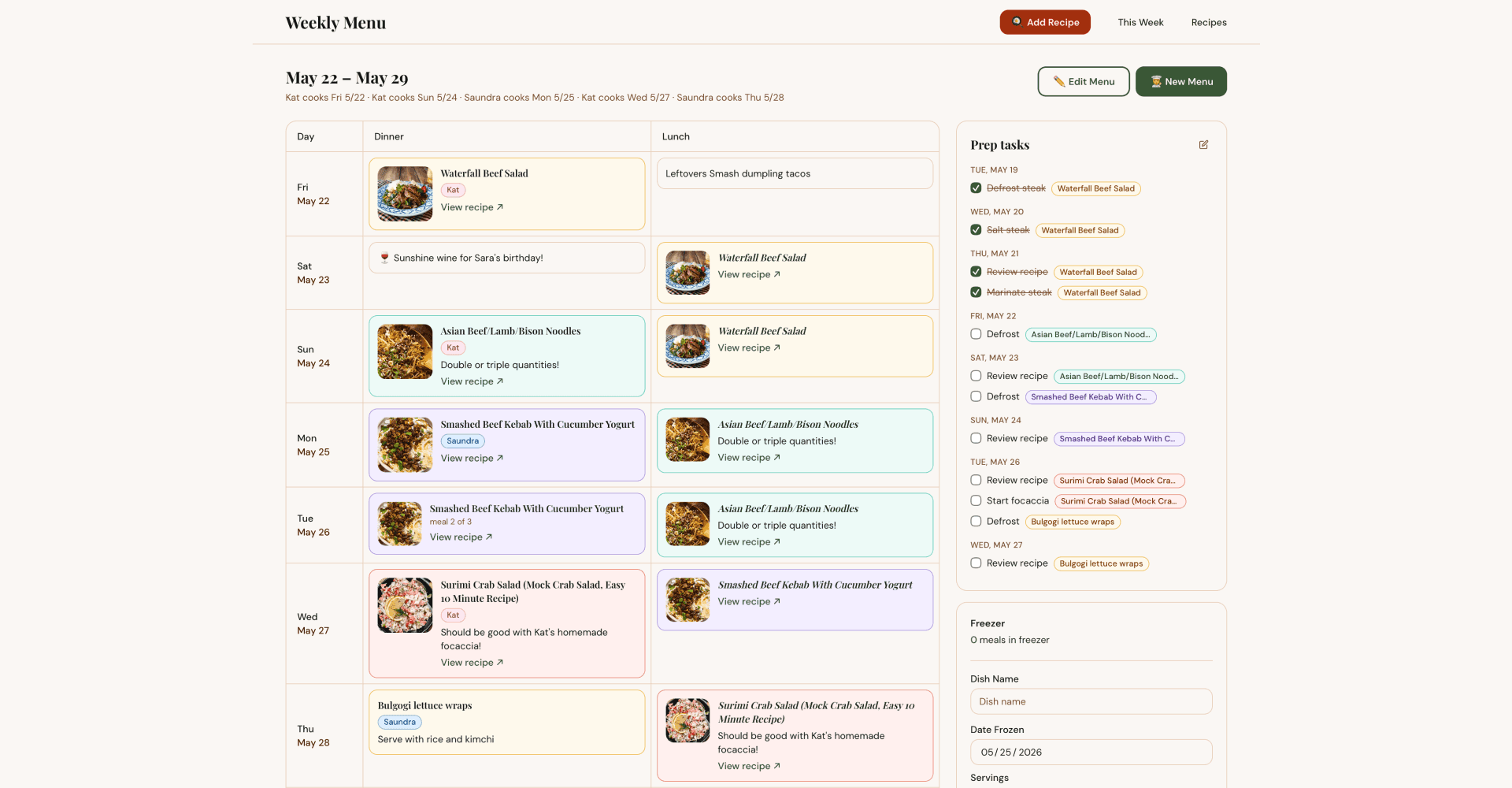
A record management and inventory problem: a daily-use household planning tool built end-to-end with AI, covering data entry, inventory tracking, and a repeatable AI-assisted design workflow.
The Hook
Most friends think weekly meal planning is insane. To them I say: now it’s a website!
The Situation
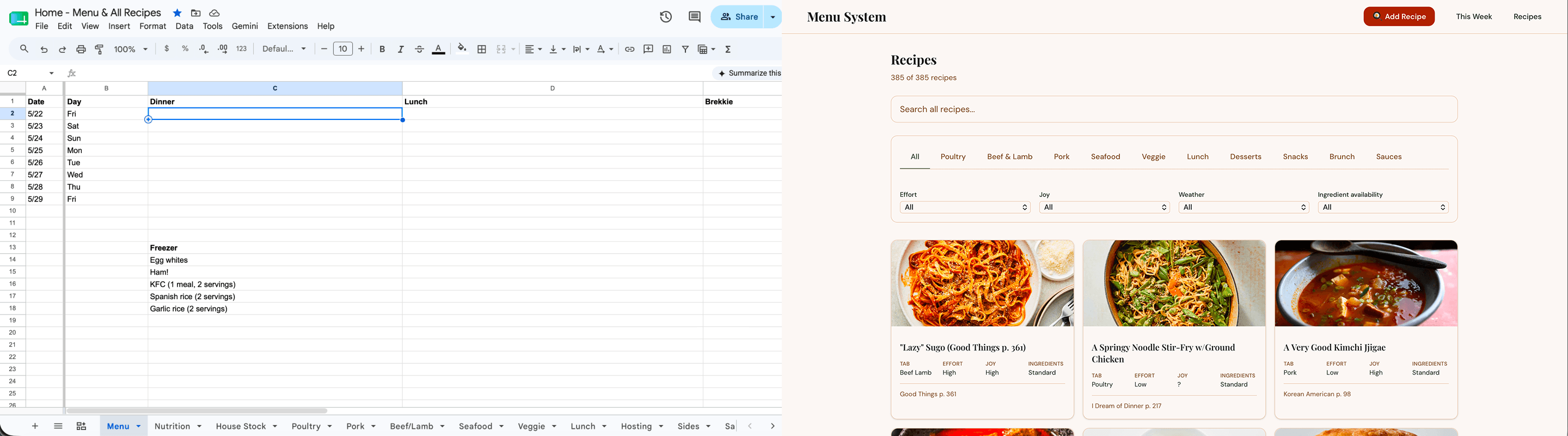
About eight years ago, Saundra, my partner, built an Excel spreadsheet to plan our meals each week. Every Friday morning we’d sit down, map out the week, then grocery shop from that list. The benefits were immediate: grocery expense dropped, food waste nearly disappeared, and we stopped ending long workdays staring into the fridge.
The spreadsheet worked, but after a layoff, opening a blank grid and deciding what to eat and cook became a genuine obstacle. No visual cues, no context, no appetite priming. At the same time, senior and principal-level job postings were calling for evidence of AI fluency.
Problem Statement
Kat and Saundra need a way to plan their weekly meals with less decision fatigue because staring at a blank spreadsheet without visual food cues makes it difficult to think about food appetizingly, leading to poor planning sessions and the occasional need for external stimulation just to get into a food mindset.
User Needs
- Quickly see what's on the menu for any given day without effort
- Enter the weekly meal plan in a way that feels engaging, not clinical
- Add recipes, notes, and cravings quickly on mobile during or after cooking
- Manage freezer inventory without it feeling like data entry
- Have the planning process itself prime appetite and food curiosity
The Tension
The first iteration aimed to be intelligent: inferring when to cook, when to use leftovers, when to order out, with the user doing little more than reviewing and approving. After significant iteration, it became clear the automation was solving the wrong problem. Household context like what kind of week it is, who has energy to cook, and what’s in the freezer couldn’t be replaced by smart defaults. The automation was adding complexity without removing the cognitive load it was supposed to eliminate.
The Approach
The build started as a copy-paste loop between Claude.ai and Cursor. Claude wasn’t just writing code; it was helping think through the product itself. What should the wizard steps be? How should leftovers cascade? What does reducing decision fatigue actually mean in an interface? Those conversations shaped the product before a single component was stable.
Once the complexity outgrew that workflow, I moved to Claude Code, working directly in the codebase with Claude as a present collaborator. Design decisions and implementation started happening in the same session.
As the visual language matured, Impeccable came in as design system enforcer. Running /impeccable teach forced explicit articulation of the design direction. Running /impeccable document scanned the codebase and generated a formal design system from what already existed: named rules, color tokens, typography conventions. Running /impeccable critiqueproduced a heuristic audit that highlighted key opportunities for improvement, some more relevant than others. The most useful function it served was as a thought partner, raising things I’d missed, and questioning or validating decisions I’d already made.
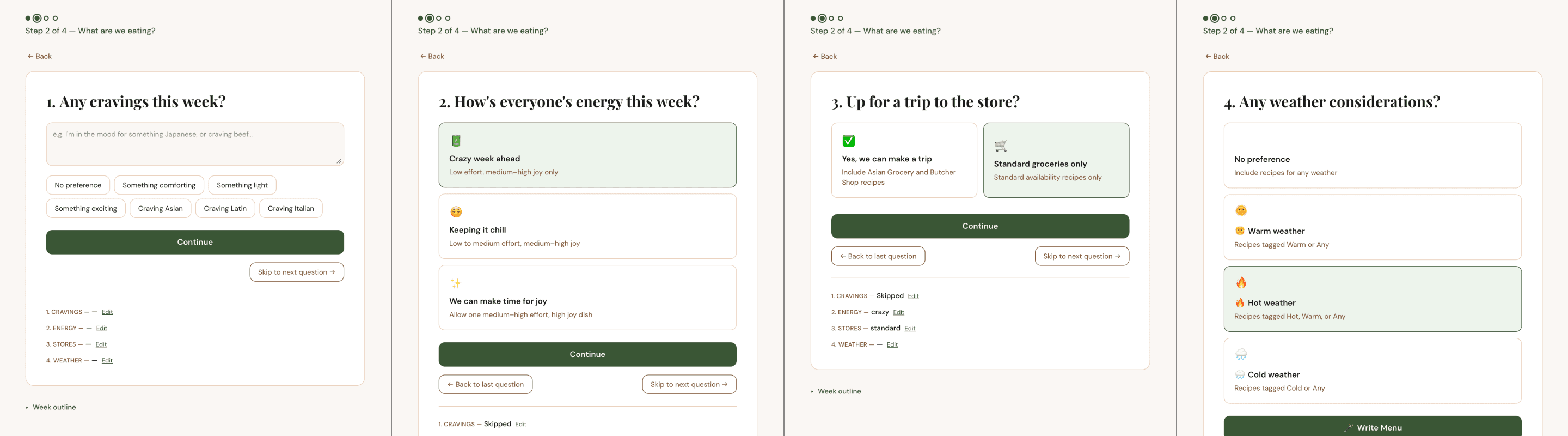
The planning wizard pivot was the most significant design decision of the project. Phase 1 was stripped back to intentional manual input: free-form text per day, drag to reorder, assign cooks. Simple, and honest about what it is. Phase 2, where the system assigns actual recipes from the library based on effort ratings and context, kept its automation because that’s the part where having too many options genuinely benefits from a filter. The part most likely to derail the project was implemented and stable in a single afternoon.
The project produced a reusable AI-assisted design workflow: a full development process running Claude Code, Impeccable, and Notion MCP in sequence, with documentation that captures design reasoning rather than just changes.
The Outcome
The app is live, deployed on Vercel, and in active weekly use. Friday planning sessions are genuinely different: visual food context before mechanics, a recipe library to browse rather than a blank grid to stare at. The grocery and food waste benefits from the spreadsheet era carried over. The cognitive load didn’t.
What This Taught Me
AI tools are most useful when they have a clearly defined role. Claude as thought partner, Claude Code as development environment, Impeccable as design system enforcer, each one doing a specific job. The moments where the process broke down were the moments where I wasn’t clear enough about what I was asking each tool to do, or accepted output without pressure-testing it against the actual user need.